Work with CKAN schemas
Configure, replace, and maintain dataset schemas in CKAN with JSON or YAML format.
In this guide
Schema format and fields
Change schema in a running CKAN instance
Declare multiple schemas
Schema format and fields
Define CKAN schemas as JSON or YAML files. Civity continues to use .json schemas, while the official documentation includes many YAML references.
A field in a CKAN schema .json file uses the following format:
{
  "field_name": "license_id",
  "label": "License",
  "form_snippet": "license.html",
  "help_inline": true,
  "help_text": {
    "en": "[dct:license] This property refers to the licence under which the Dataset is made available.",
    "nl": "[dct:license] Deze eigenschap heeft betrekking op de licentie waaronder de Dataset beschikbaar wordt gesteld."
}
where:
-
field_nameis CKAN field id -
labelis UI field representation -
help_textis text that appears beneath a field in the UI next to theiicon. Square brackets are omitted and in this particular example contain information about how this field maps to DCAT-AP. Read more about these mappings and custom fields in CKAN DB Structure and Fields Mapping Strategy.Schema documentationRefer to the documentation for field keys and schema specifications: CKAN GitHub official repository..
Additional field keys include:
-
repeating_subfields: Defines repeating field groups within a dataset schema. May be useful for handling cardinality issues. Not currently used by Civity. -
start_form_page: Controls which multi-page form stage displays the field (recently added feature). Determines field placement across the dataset creation workflow stages. Not currently used by Civity. -
choices: Defines static dropdown options as a list of dictionaries withvalueandlabelkeys. -
choices_helper: Generates dropdown options dynamically from an API or another schema field. For example, you can reference another schema and retrieve field values from it. -
presets: Applies predefined field configurations such asradio,multiple_checkbox, ordate. Enables automatic validation and rendering without defining custom snippets. -
form_snippet: Defines custom field input rendering using Jinja2 templates. Interacts with CKAN UI to customize field representation for data input. Use when presets don't provide sufficient control. -
display_snippet: Defines custom field display rendering using Jinja2 templates. Interacts with CKAN UI to control how stored values appear (e.g., rendering email addresses as clickablemailto:links). -
display_property: Overrides the RDF property representation for the field. Useful when mapping CKAN fields to specific DCAT vocabulary terms. For example, mapping to DCAT:- field_name: author
label: Author
display_property: dc:creator -
validators: Validates field data using CKAN's built-in validation functions (see the complete list of available functions). Custom validators can also be added. By default, minimal validation is applied:ignore_missing(accepts missing values) andunicode(text encoding).- When defining custom validators, explicitly include these default validators if needed.
- To create custom validation functions, implement an extension with the
IValidatorsinterface that returns your validation function from theget_validators()method.
See the validation functions documentation for implementation details.
-
output_validators: Handles deserialization when retrieving fields from the database. Complex data structures assigned to a field are converted to strings when stored in the database. This property defines validators for extracting the field from the database and converting it back to its object representation.
Change schema in a running CKAN instance
Define the schema in setup_scheming.sh by setting
ckan config-tool $CKAN_INI -s app:main \
    "scheming.dataset_schemas = ckanext.healthri:scheming/schemas/gdi_userportal.json"\
    "scheming.presets = ckanext.scheming:presets.json"\
    "scheming.dataset_fallback = false"
where ckan config-tool forms part of the CKAN Command Line Interface. Review the documentation for more information on config-tool usage.
In a running Docker container, the configuration file srv/app/ckan.ini defines this in the scheming.dataset_schemas parameter. This should reference an extension under the /src/ directory of the ckan-docker repository.
To replace the schema, run:
docker exec -it ckan /bin/sh
vi /srv/app/ckan.ini # change the schema
Changing the ckan.ini file triggers a CKAN update, applying changes almost immediately.
Define schemas in the following format: <extension name with dashes replaced with dots>:<path to shema .json file>. Clone the extension under /ckan-docker/src.
The path from the example above (ckanext.healthri:scheming/schemas/gdi_userportal.json) resolves to the following:
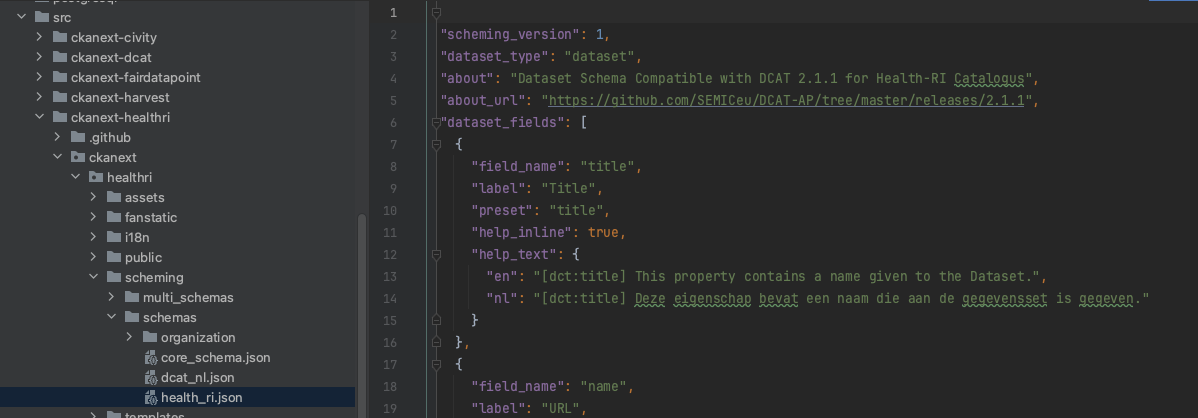
Declare multiple schemas
Scheming uses the IDatasetForm interface to override schemas.
In CKAN.ini file
Define multiple (space-separated) values in scheming.dataset_schemas. CKAN core and Civity-extended CKAN differ in behaviour: core CKAN picks the latest schema when two share the same dataset_type field. Civity improves this by merging schemas of the same type, reflecting the order specified in scheming.dataset_schemas in the CKAN UI field order.
The ckanext.scheming.overwrite_fields parameter defines rules for merging. When set to true, and schemas to merge share fields, the system prioritises definitions from the latest schema. Fields are never deleted; they can only be added or modified. To delete a field, undeclare it or explicitly set it to empty. The system implements this behaviour in ckanext-scheming/ckanext/scheming/plugins.py (_combine_schemas) and documents it only at code level.
In a multischeming declaration .json file
Civity initially implemented this to allow extensions to have their own schema merged into the core schema.
For maintenance purposes, provide a .json config file under ckanext-healthri/ckanext/healthri/scheming/schemas/ instead of managing schemas in the ckan.ini file, with content like the following:
[
  {
   "dataset_type": "dataset",
   "about": "Dataset",
   "about_url": "https://dataplatform.nl/what-is-a-dataset",
   "schemas": [
      "ckanext.healthri:scheming/schemas/core_schema.json",
      "ckanext.healthri:scheming/schemas/health_ri.json"
    ]
  }
]
This also allows several schemas simultaneously, e.g.:
[
  {
   "dataset_type": "dataset",
   "about": "Dataset",
   "about_url": "https://dataplatform.nl/what-is-a-dataset",
   "schemas": [
      "ckanext.healthri:scheming/schemas/core_schema.json",
      "ckanext.healthri:scheming/schemas/health_ri.json"
    ]
  },
  {
   "dataset_type": "geo_dataset",
   "about": "Geo Document",
   "about_url": "https://dataplatform.nl/what-is-a-geo-document",
   "schemas": [
      "ckanext.healthri:scheming/schemas/geo_document.json"
    ]
  }
]
Add the scheming.dataset_multi_schemas property to the ckan.ini file with a path to the schemas file, e.g.:
scheming.dataset_multi_schemas = ckanext.healthri:scheming/schemas/multi_schemas.json
Civity documentation on multiple schemas configuration.
Control which datasets are declared via the API:
GET http(s)://<ckan-host>/api/action/scheming_dataset_schema_list
and then
GET http(s)://<ckan-host>/api/action/scheming_dataset_schema_show?type=<dataset_type>
UI search of all dataset types is configured in ckan.search.show_all_types parameter (see documentation).